
Bypassing Conditional Access policies that have a resource exclusion
There is a documented enforcement gap in Conditional Access policies that apply to “all resources” but have an exclusion for at least one resource. What is not documented, is that this gap is much larger than what one would expect, and that the documented mitigation doesn’t actually work. The good news if you are an Entra admin is that this is now considered legacy behaviour that Microsoft is changing and that if your tenant isn’t automatically migrated yet you can opt-in to the new behaviour which addresses and fixes this issue. If you have a policy with a resource exclusion, I would highly recommend applying this change.
Why this blog
This bypass has a bit of a backstory and is mostly based on other peoples prior research. I was already aware of the documented parts of this issue when I collaborated with Fabian Bader on our TROOPERS talk last year. The non-documented parts came to light over the past year when several people reached out to me discussing weird behaviour of Conditional Access where tokens with a limited scope could be obtained despite Conditional Access policies being in place that should have blocked this. So while I did some research on this topic by myself, most of it was already found by other people. The only public resource that describes this that I’m aware of is this blog by Syntax-Err0r, who goes by the handle Jmcgill on the BloodHound slack. The blog also describes that the issue was reported to MSRC and deemed as “by design”. I think marking this as by design was a mistake by whoever triaged this issue on the Microsoft side, probably caused by a lack of understanding of the complexities involved in this flow.
I decided to do some further research on this topic as part of the effort Fabian and I started last year to map known CA bypasses. After confirming the same issue and its implications, I submitted the write-ups with a root cause analysis and implications to MSRC in the hope of changing their mind. After some back and forth with Fabian, he figured out that the Microsoft recommended mitigation for this issue did not actually work either, which led to a new twist on this story and a few more MSRC reports. Unlike the reports from the other researcher(s), Microsoft acknowledged the issue this time and is now rolling out a change that fixes this bypass by default, though it may depend on your tenant when you receive the new setting.
Even though parts of this are already in the public domain, I decided to write a blog on this for the following reasons:
- Adding more awareness to the risks that are/were there when a CA policy has a resource exclusion.
- Explaining the technical background to why this exclusion was there in the first place and what mechanics make the bypass possible, since this is a complicated issue that I feel most people do not understand.
- Motivate tenant admins to opt-in to the new behaviour as fast as possible or at the very least have an accurate picture of the risks if they cannot migrate yet.
With that out of the way, let’s dive into the actual mechanics.
The resource exclusion behaviour explained
In an OAuth2 authentication flow, there are 2 important parameters we specify, the client and the resource. The client is the client application that we are using, for example Teams or Outlook to name two common Microsoft clients. The tokens these clients get are for a specific resource, like https://graph.microsoft.com or https://sharepoint.com. Resources are the API’s that host our data, or the apps that we access. Conditional Access policies are created on a per resource basis, which means that if I create a policy that targets Exchange then it does not depend on the client that I use in a sign-in, but that any client that requests a token for Exchange will trigger the policy. The “resource” part of the CA policy used to be called “Cloud apps” in the past, which didn’t really reflect the mechanics that underpin the authentication flows.
There is one specific form of signing in where the “cloud apps” terminology makes sense, which is when we are signing in to web applications with the OpenID connect flow. In this case, the client and resource are identical, since we are signing in to that app itself and not to a specific upstream API (resource). That is also why if we create a policy that targets a web based application as the target resource the policy will apply when we sign in to that app.
Now on to the exclusion. If we apply a policy to “all resources” it will trigger regardless of what resource we specify during the sign-in flow and the CA engine can force the controls during every sign-in flow (except a few corner cases covered by user actions). Once we add an exclusion, things get a bit more complicated. Let’s say we want to force a certain control (like MFA) for all sign-ins, except for a one app we don’t deem important or which breaks if we enforce the control. We then add one excluded resource, which is the application we want to exclude. All sign-in flows, except for the one that signs us in to that excluded application should enforce the policy. There is however one problem with this, which relates to the Microsoft Graph (and previously also the Azure AD Graph, though that one is now already blocked for almost all apps). In the real world it is quite common that apps do not exclusively use the OpenID Connect flow (reflected by the scope openid), but also request a token for the Microsoft Graph to query some information about the user. This is often done with a very basic scope such as User.Read. You can see this in several examples, such as the code snippet below which is an example flask app on using the Microsoft Authentication Library (MSAL):
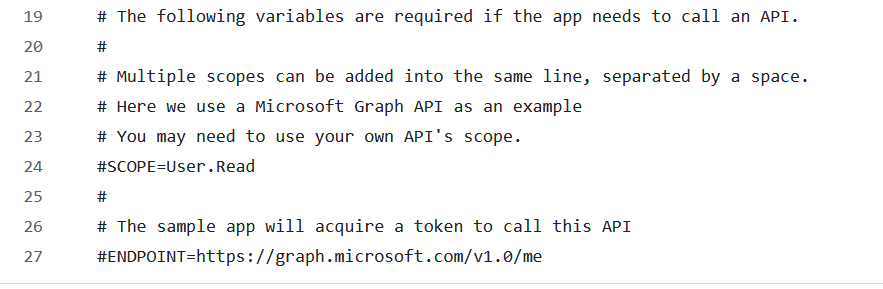
Now the Conditional Access policy evaluation is a bit more complicated. We don’t just sign in to the application, but also request a token for the Microsoft Graph resource. The Microsoft Graph resource is a bit of a special case, since the Microsoft Graph API can be used to access information in many backend resources depending on the delegated permissions (scopes) our application has. If we would strictly enforce the Conditional Access policy (which is what the new behaviour does), requesting any token for the Microsoft Graph as a resource would not hit the exclusion part of our policy, since we only excluded one specific app and not the Microsoft Graph. This means the policy would still trigger, which may not be what the admin expected, and which may break the sign-in flow. It isn’t possible to add an exclusion for the Microsoft Graph itself to the policy, which leaves us with no way to allow the app this limited access to information.
To make this flow easier for admins, Microsoft decided that once you have an exclusion on your “all resources” policy and the excluded app only requests very limited scopes such as User.Read, they will allow a token with these scopes to be issued. In fact, they would then allow all apps to request these low privileged scopes without triggering the policy. What is interesting is that even if you created a different policy that covered that one excluded resource and forced the same control, it would still allow the low-privileged scopes. Which means that there is a gap between an “all resources” policy and a set of two policies where one applies to all resources with 1 exclusion and a separate policy for that exclusion. Fabian covered this nicely during our Troopers talk and also discussed this in his blog on this topic.
The question is of course what an attacker can do with this. If we read the documentation, we find a list of low privilege scopes that are allowed:
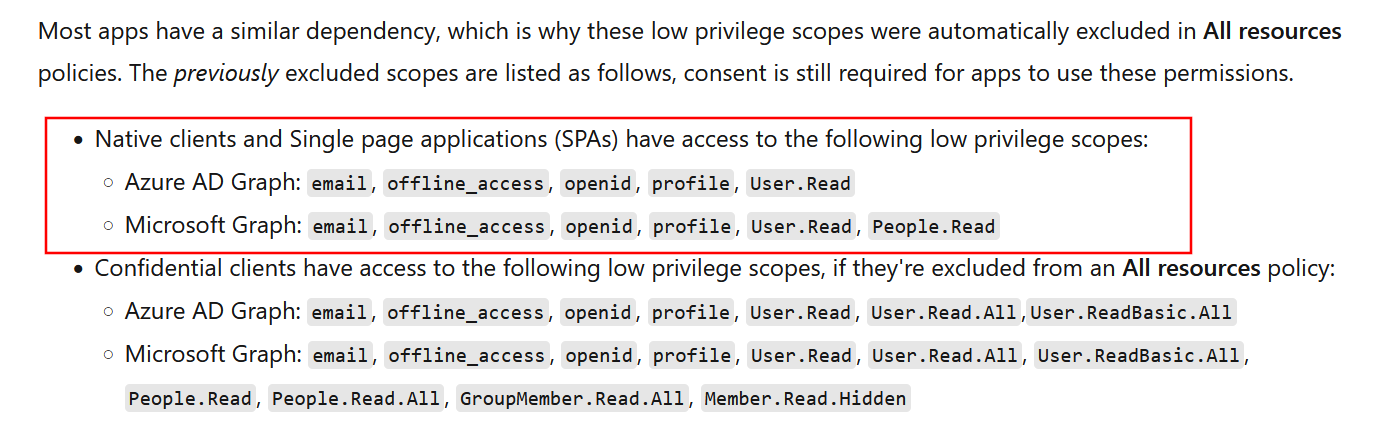
There is a difference between public clients and confidential clients in this corner case. For attackers, the public client scenario is the most likely, since having a confidential client would imply the attacker already has control over an app in the victim’s tenant and possesses a client secret or certificate to authenticate to that client, which is an unlikely initial access scenario. Public clients are much easier to attack since we can simply use the client ID during the login flow to pretend to be one of these public clients. Many Microsoft owned (first-party) public clients are available, you can find them on entrascopes.com which is the project Fabian and I created to map these.
If we look at the allowed scopes for public clients, these are not very privileged and only impact data from the user. If we have valid credentials for a user, we can potentially bypass policies with a resource exclusion, but the access is only limited to reading their profile. Not such a big deal right? And if you really want to close this gap, Microsoft also documents a mitigation in the “protect directory information” section, though it is quite convoluted as it involves creating a custom attribute and populating that on the Azure AD Graph service principal.
The scope is a lie
All of this wouldn’t really be a problem if the documentation was accurate and these scopes would be enforced properly. Over the past few years several people came to me with weird corner cases where Microsoft apps were able to access Entra ID information over the Microsoft Graph even if the scopes in the token suggested that this should not be possible. Sadly this is another example where the documented restrictions we read about on Microsoft Learn are accurate for our applications, but not always for Microsoft’s own apps. It turns out that for some Microsoft apps, the scopes in the token are ignored and more data access is allowed than what should be allowed if the scopes were actually enforced. This reminded me of Eric Woodruffs research from a few years ago where he figured out that Microsoft apps can perform actions via the Microsoft Graph via some opaque permission system that is undocumented and invisible for tenant admins. The same applied to the scopes in a token. Even though the token did not have scopes to access information about users or groups in the tenant, calls to the Graph API requesting this information did in fact return data.
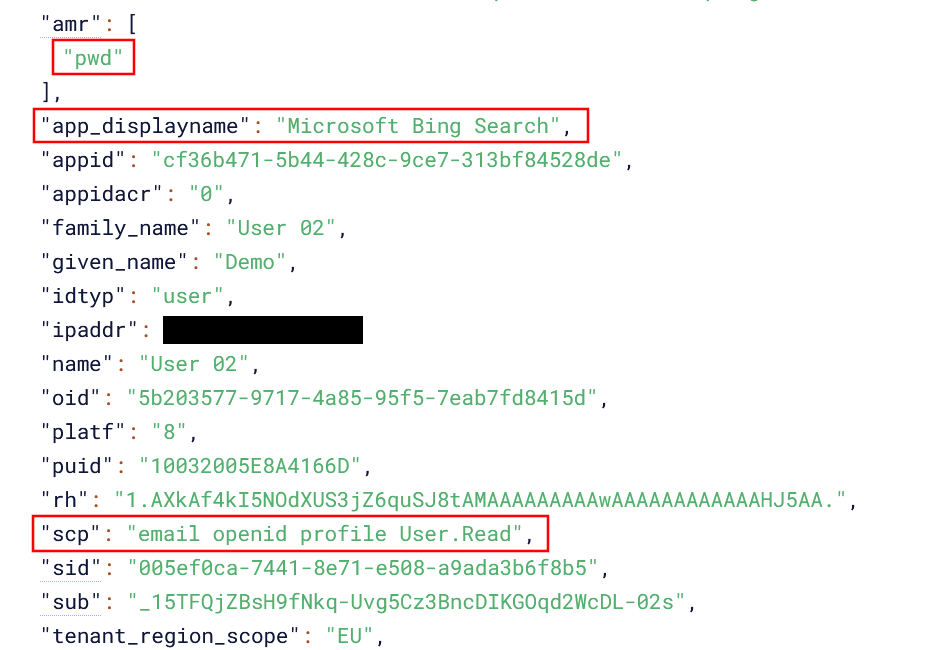
I decided to incorporate this into one of my testing scripts. Instead of just gathering the scopes, the script would now also try to request data over the Microsoft Graph even if the scope indicated we didn’t have that kind of access. Using this technique, several apps were identified that despite having limited access can still enumerate data in Entra ID. An example is the app “Microsoft Bing Search” with client ID cf36b471-5b44-428c-9ce7-313bf84528de. We request a token with limited scopes, within the boundaries of the documented behaviour:
roadtx interactiveauth -s 'https://graph.microsoft.com/User.Read email profile openid' -c cf36b471-5b44-428c-9ce7-313bf84528de
In the screenshot below we see that the token we get when authenticating to this client has indeed the limited scopes we asked for:
When we ignore what the scopes say and simply try to call the Microsoft Graph, we do have the ability to read tenant information, in this case listing the service principals in the tenant:
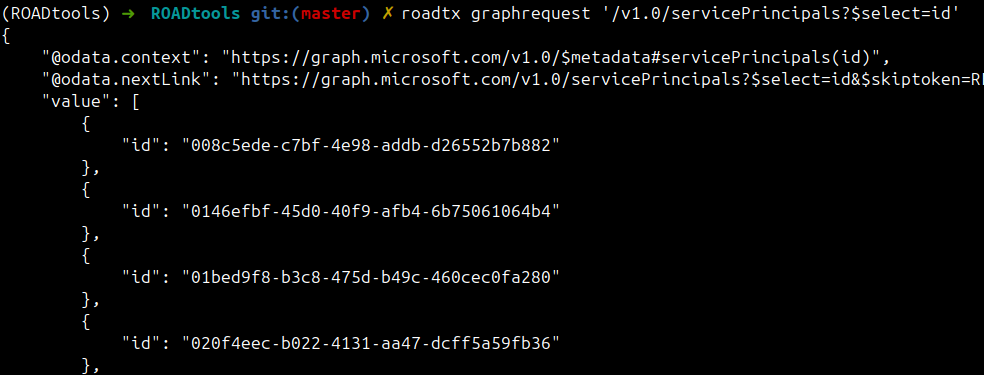
For this specific client, despite the scopes not permitting this data access, one can query the following information in Entra ID (based on working endpoints on the Microsoft graph):
- users
- groups
- devices
- contacts
- applications
- servicePrincipals
- directoryRoles
In my test case the control in place was Multi Factor Authentication, but the bypass works regardless of what the control is. If there is a policy that excludes one resource, whatever that control is can be bypassed and we can query Entra ID data based on the token issued. While this is a limited bypass in the sense that we can’t use it to access mail or files, we can use it to bypass a policy and potentially expose personal information from users. I have encountered such a policy in several real-world cases where it could be used to bypass MFA and enumerate tenant data, so this is not simply a theoretical exercise. It is not only limited to reading information, as I’ve found a few apps with hidden scopes that could also be used to modify information in the tenant, provided the user had sufficient rights to do so.
The Protecting Directory Information mitigation
In case the documented part of this behaviour (allowing limited scopes to be issued if an “all resources” policy has an exclusion) was not desirable, Microsoft provided mitigations on how to fix the gap. This involved quite a few steps, since the mitigation required targeting the “Windows Azure Active Directory” resource, which can only be done with custom security attributes. If you went through all the effort, which I’ve not seen in any real-world scenario, you would think that it’s now no longer possible to request these tokens. If we run the same command as before, we are now prompted for MFA:
roadtx interactiveauth -s 'https://graph.microsoft.com/User.Read email profile openid' -c cf36b471-5b44-428c-9ce7-313bf84528de
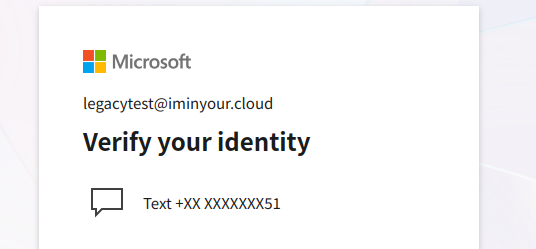
I discussed this with Fabian, who a few weeks later ran some of his own test and found more oddities. Even with the stricter policy in place, he was seeing authentication succeed with single factor authentication for a few specific clients. It turns out that if you only request the openid scope you will still be issued a token. If we change the above command to reflect this, then authentication will in fact work again:
roadtx interactiveauth -s 'https://graph.microsoft.com/openid' -c cf36b471-5b44-428c-9ce7-313bf84528de
While the token now no longer includes the User.Read scope we can still request the same Entra ID information as before, which shouldn’t be a surprise because we already found out the scopes were ignored entirely by the backend.
The sign-in logs also reflect that the policy for protecting directory information was not applied.
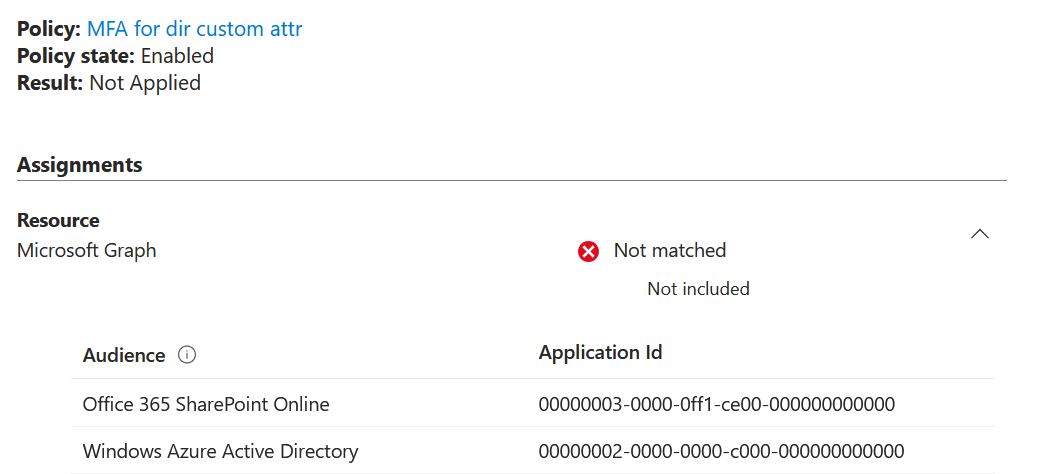
To conclude, even if you applied the documented mitigation for this gap, the policy could still be bypassed, and attackers could enumerate and modify data in the tenant.
The fix
As Microsoft announced in January, the enforcement of these policies is changing starting June 15th. The announcement blog does not mention the undocumented gaps that the legacy behaviour has and only mentions how the behaviour will change. In my opinion tenant admins should be aware of the risks that they run as long as this change is not automatically rolled out in their tenant, which can take months, or when they choose to opt in to continue the legacy behaviour. There is some good news though, which is that you can already opt-in to the new behaviour, described in this document.
To do so, you will need to access a hidden interface via this direct link to the Entra Admin center, and configure the baseline scope enforcement as enabled.
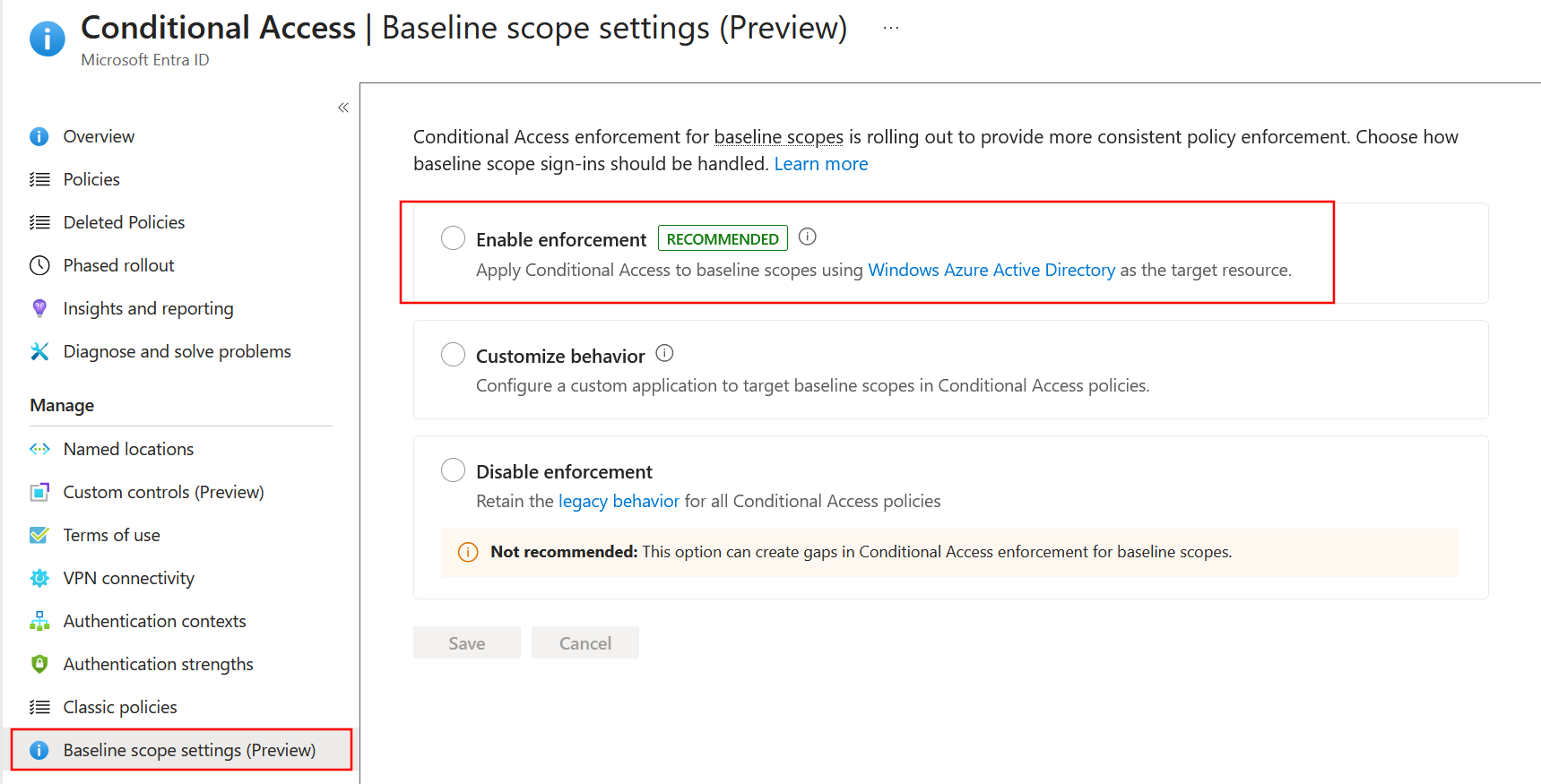
After the enforcement is enabled, the CA policy bypass stops working and the controls are enforced for these applications when they request tokens for the Microsoft Graph.